wsy
1
Most mainstream AI products on the market require internet connectivity, have usage restrictions, and some are charged. There is also a potential risk of privacy leakage through file uploads. This tutorial leverages Docker and OpenCode to set up a free, offline, usage-unrestricted, and privacy-controllable local private AI on a NAS.
Step 1: Install the opencode image via Docker
Step 2: Deploy the opencode container, and mount your NAS main disk directory to the container path /workspace
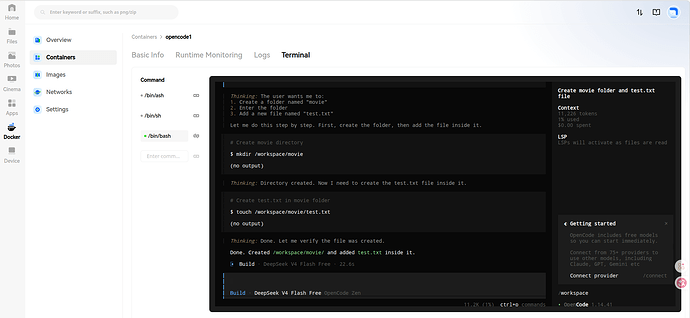
Step 3: Access the terminal of the opencode container
- Enter the /workspace directory
- Run the command: opencode
- Type /models to switch models (built-in free models are available)
- Start using AI. Example command:
1、Obtain the detailed list of the current file
2、Create a folder named “movie”. After creating it, enter the folder and add a new file named “test.txt”
2 Likes